



Fast Fingers, Sharp Mind
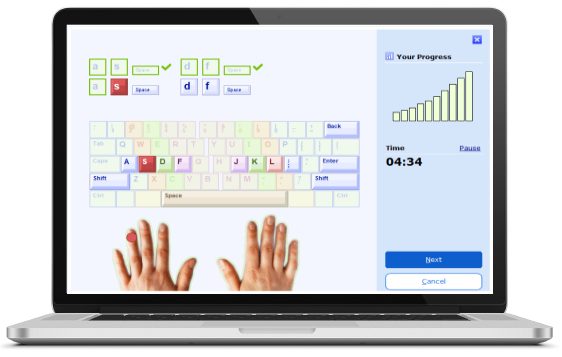
TypingMaster 11 for Windows includes a free one-week touch typing course to help you build both speed and accuracy, progressing from beginner to professional level.
The built-in TypingMeter tool tracks your progress in real time and creates custom exercises to fix weak spots.
Why Learning to Write Fast Still Matters?
In today's world, computers and electronic devices are essential for both work and daily life. Strong keyboard skills improve communication, productivity, and efficiency. Despite advances in voice recognition and AI, manual text input remains crucial. Mastering touch-typing enables effortless, accurate work without looking at the keyboard, enhancing focus and speed.
Beyond speed, proper technique supports ergonomics, preventing strain from long hours at a computer. Proficiency opens opportunities in fields like programming, data entry, and content creation. Whether for study, work, or personal growth, improving keyboard skills helps you work smarter and more comfortably.
In a connected world, fast and accurate typing enhances communication, reducing time spent on routine tasks and freeing you for creativity and problem-solving. Investing in keyboard mastery is a step toward greater efficiency and success.
How to Practice Keyboarding with All Fingers?
Mastering keyboarding is much like playing the piano. Each finger has a designated set of keys to press, and training them to move effortlessly builds muscle memory. Just as a pianist practices scales and finger placement, a typist learns key distribution through structured exercises. Our keyboarding program introduces new keys gradually, starting with isolated practice before incorporating them into small words using the letters learned so far. As you progress, exercises expand to longer words, full sentences, and comprehensive text drills. Through repetition and continuous practice, you develop speed, accuracy, and fluency, much like a musician mastering their instrument.
It's important to approach learning keyboarding systematically. Start by familiarizing yourself with the home row, the middle row of letters where your fingers rest when not in use. From there, learn the reaches to other keys, ensuring you use the correct finger for each key. Consistency is key; by always using the same finger for each key, you reinforce the neural pathways that make touch-typing possible. Additionally, consider incorporating educational games and interactive exercises to make learning more engaging. These tools can help maintain motivation and make practice sessions enjoyable.
Type With All Fingers
Ready to Type Faster?
Many people search for ways to type in speed, but the key is developing both speed and accuracy. At TypingMaster, we help you train your fingers and sharpen your accuracy so you can type in speed with confidence. Typing Master Pro is a powerful typing tutor that will help you improve your typing substantially whether you are a novice or a professional typist. This powerful tutor provides nine different courses designed to meet your evolving needs as your skills and speed improve. The complete touch-typing course teaches the technique from the ground up, starting with the basics and advancing step-by-step. It utilizes examples, word drills, and games to familiarize you with the keyboard in an interactive and engaging manner. Once you have a grasp of the fundamentals, the Speed Building course helps you refine your skills. This course is beneficial for seasoned typists looking to maintain or enhance their proficiency. Additional courses focus on numbers, special character keys, and the numeric keypad, ensuring you become a well-rounded keyboard user. By following these structured courses, you can steadily increase your speed and accuracy, ultimately achieving professional-level competency.
Type Faster
How Long Does It Take to Learn to Touch Type?
The time it takes to learn touch-typing varies depending on individual factors such as prior experience, practice frequency, and learning style. On average, it takes between 6 to 10 hours to complete the full version of the basics course. If you're short on time or prefer a condensed learning experience, you can opt to complete only the first two units of Lessons 1–10. These units will teach you the location of the alphabet keys on the keyboard, providing a solid foundation for further skill development.
Remember, you have the flexibility to choose how many lessons, exercises, and writing tests you complete. You can progress at your own pace, moving on to new lessons whenever you're ready. Consistency is crucial; regular practice reinforces the skills you're learning and helps build muscle memory. By dedicating time each day or every other day, you can make steady progress and see tangible improvements in your keyboarding abilities.
Learn To Type
How Long Should I Practice Keyboarding Daily?
As touch-typing is a cumulative motor skill, regular typing practice is essential for improvement. Ideally, you should aim to practice daily or at least every other day. Consistent practice helps reinforce the neural pathways associated with touch-typing, making it easier to recall key locations without looking at the keyboard. Short, focused practice sessions are often more effective than infrequent, longer ones. Aim for periods ranging from 15 minutes to about 45 minutes.
Everyone's learning curve is different, so it's important to find a practice routine that works best for you. Some may find shorter, more frequent sessions beneficial, while others may prefer longer sessions less frequently. The key is to maintain consistency and keep challenging yourself with new exercises and drills. Additionally, incorporating variety into your practice, such as different types of exercises or story texts, can help maintain interest and improve various aspects of your keyboarding skills.